Elementary schools use one family app that combines two-way messaging, a feed of class and school news, sign-ups and forms, conference booking and recognition, so parents can hear from school, answer in one tap and see their child’s day in a language they read. Some schools assemble the same set from several separate tools; the trade-off is how many logins a parent has to manage.
Low involvement often comes down to friction. A parent who misses the flyer, cannot read the email, or has to log in to a fourth system to sign a permission slip may simply have hit one barrier too many. This guide walks through the five jobs your tools have to do, the mistakes that undo them, and what to ask before you choose.
The five jobs your tools have to do
1. Reach every family, on a channel they actually use
Involvement starts with being reachable. Some families will use an app, some will only read a text, and some will only answer a phone call. A school that sends everything through one channel has decided, without meaning to, which parents it will hear from.
Look for one place to send a message that goes out by app push, text, email and automated voice call, with replies coming back to a single inbox. Mass messages where each parent replies privately matter too, because a family will not answer a question that the whole class can read.
2. Make the ask small
“Please volunteer” gets a few answers. “Pick a slot for Friday’s field day” is easier to say yes to, because the family can see exactly what is being asked and finish it quickly. The same goes for forms. A permission slip that can be signed on a phone and shows up on the family’s own list of pending items is easier to return than a paper slip in a backpack.
So the second job is replacing open-ended requests with specific, finishable ones: sign-up boards for events, field trips and classroom needs, digital forms and permission slips, and calendar events with an RSVP and an automatic reminder.
3. Show families their own child’s day
Parents get involved when they can see something to be involved in. A feed that puts a classroom photo next to the principal’s update and Friday’s reminder gives a family a reason to open the app on purpose. Portfolios of student work do the same thing at a slower pace: a parent who can scroll from September’s handwriting to May’s research project has something specific to say at the dinner table.
The test is whether the parent sees their child’s information first, or the school’s org chart first. A parent with two children in two classrooms should not have to hunt.
4. Make conferences easy to book
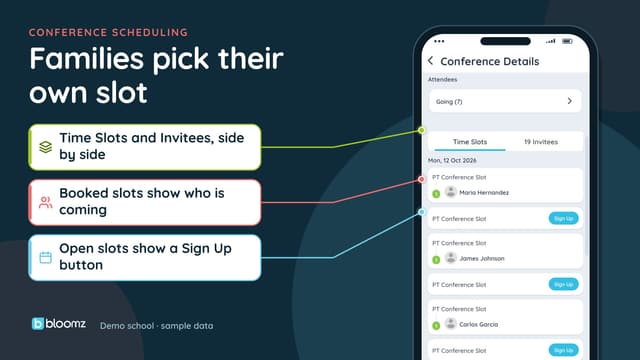
Conferences are the most direct form of involvement an elementary school offers, and booking is where many families fall off. Auto-scheduled sign-ups, a clear list of open times, and a school-wide dashboard of booking numbers let you follow up with the families who have not booked instead of re-sending the same message to everyone. On current app versions, Bloomz records a family’s language and interpreter need at booking, so staff know what to arrange before the meeting. Bloomz does not assign or schedule interpreters. For more, see how to boost conference sign-ups among hard-to-reach families.
5. Send good news, not only reminders
Many parents only hear from school when something has gone wrong, so they learn to brace for the message. Recognition changes that. Families often respond more readily to a specific good-news note than to another reminder. We cover this in why PBIS recognition has to reach home.
Mistakes that cancel out the effort
- Using five tools for five jobs. A newsletter app, a text tool, a sign-up site, a forms tool and a conference scheduler mean five logins for a parent.
- Translating the message but not the app. If the text of a message is translated but every button, menu and form is in English, a family still cannot act on it. See message translation vs full app translation.
- Measuring sends instead of reach. “We sent 40 messages” tells you nothing about the families who never saw one. Track which families you cannot reach, and which languages they speak. Our piece on family engagement metrics that matter goes deeper.
- Asking only for help. A school that only writes when it needs something teaches families to tune it out. Mix in good news.
- Making teachers the bottleneck. If every message, form and sign-up has to be built from scratch by a teacher, the tool will not get used past October.
What to ask before you choose
When you compare options, ask these questions and get answers you can test in a demo:
- Does one app cover messaging, the feed, forms, sign-ups, calendars and conferences, or will families need several?
- Is the whole experience translated (menus, buttons, forms, notifications), or only the message text?
- Is messaging two-way, and can a family reply by text without installing anything?
- Is it free for families? A paid parent tier shrinks reach.
- Can staff see which families have not been reached, and why?
- Does it help staff write messages quickly, with a person approving what goes out?
- Is recognition for students in the same system as communication, or in a separate tool no parent sees?
Other tools schools use
Several well-known tools cover part of this list. ClassDojo is widely used in classrooms, ParentSquare (which acquired Remind) is common for school-to-home messaging, and TalkingPoints is known for translated family texting. Our comparison of school communication platforms lays out the differences.
How Bloomz covers these jobs
Bloomz covers all five jobs in one app, depending on plan. Family engagement gives each family one place for class moments, announcements, portfolios, behavior recognition, attendance, events and pending forms, organized around their child. Communication covers two-way messaging, private mass messages where each parent replies privately, and alerts by app push, text, email and voice. Families can get and answer text messages without an app or a login.
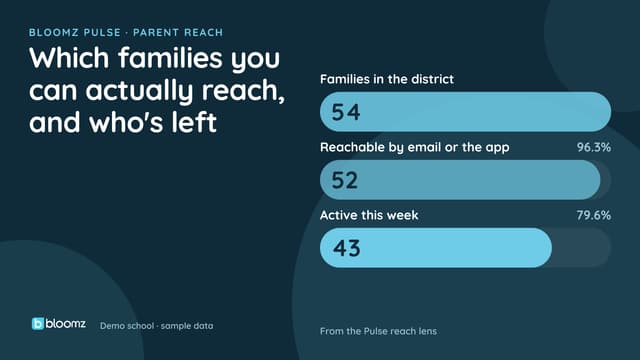
Conferences has auto-scheduled sign-ups and a school-wide dashboard, and forms covers translated digital forms and permission slips. Behavior and recognition puts points, houses and positive notes home in the same app, in the family’s language. Bloomz is always free for families. Bloomz Pulse, the admin dashboard, shows parent reach, including students with no reachable family and reach broken down by home language. Details for classroom teachers are on the teacher page.
Which plan you need depends on the pieces you use: forms and the full Pulse dashboard are on Bloomz Premium and up, points and positive notes are on Complete and up, House Points and the conference dashboard are on Bloomz 360, and the pricing page shows what each tier includes.
Common questions
What is the best app for parent involvement in elementary school? The best one is the one a family will open and can act in. Look for a single app with two-way messaging, a feed, forms, sign-ups and conferences, translated for your families and free for them.
How do I get parents who never respond to engage? Start by checking whether they can actually read and reach what you send. Offer text replies with no login, make requests small and specific, and send some good news before you ask for anything.
Do elementary schools need more than a messaging app? Often yes. Messages are only one job. Sign-ups, forms, conferences and recognition are where involvement actually happens, and they work better when they sit in the same place as the messages.
How do you involve parents who do not speak English? Translate the whole experience, not only the message, and let families reply in their own language. See our guide to engaging multilingual families.
How can I tell whether our parent involvement is improving? Track reach (which families you can contact), response to specific requests, and conference booking by group, rather than the number of messages sent.